Backup management,
reimagined.
Safe in the heavens.
Stop guessing about your backups. See every job, every schedule, every client — in one modern interface. Open source and cross-platform.
A Modern Interface for Bareos
Real screenshots from the current version — light and dark theme included.
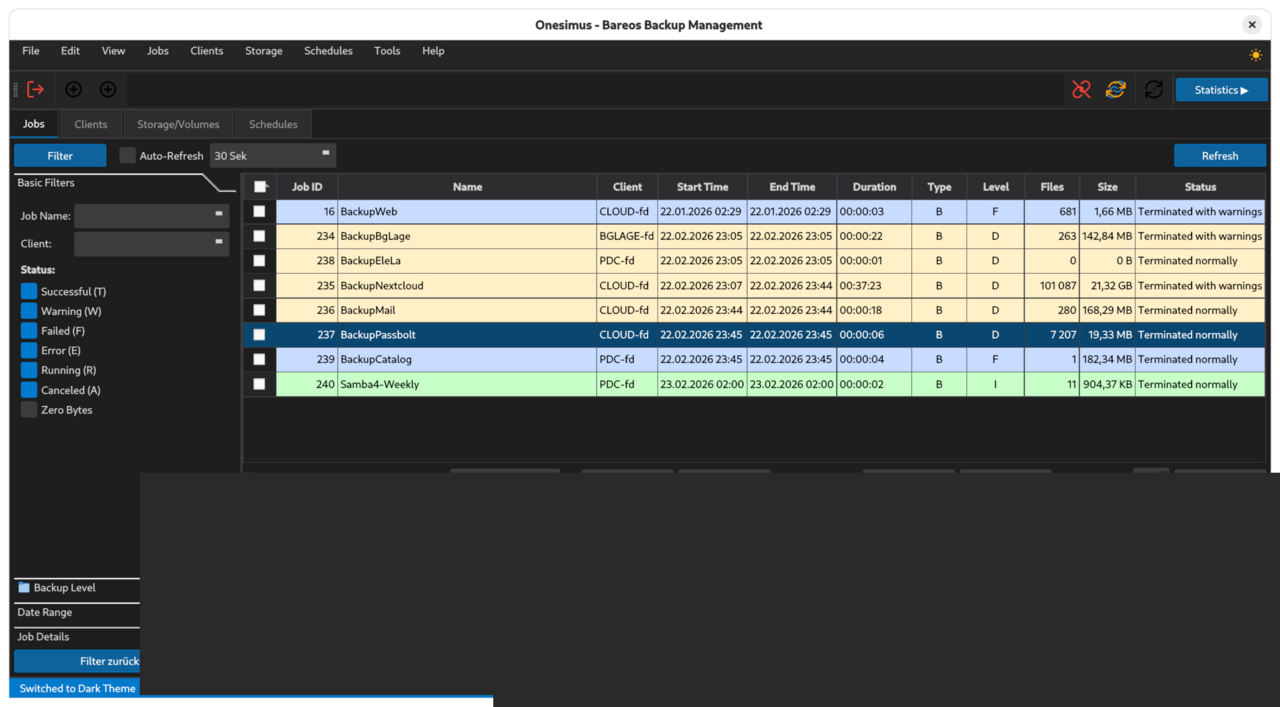
Job list with color-coded backup levels and filter sidebar — dark theme.

Client overview with connection status, OS detection and statistics — light theme.
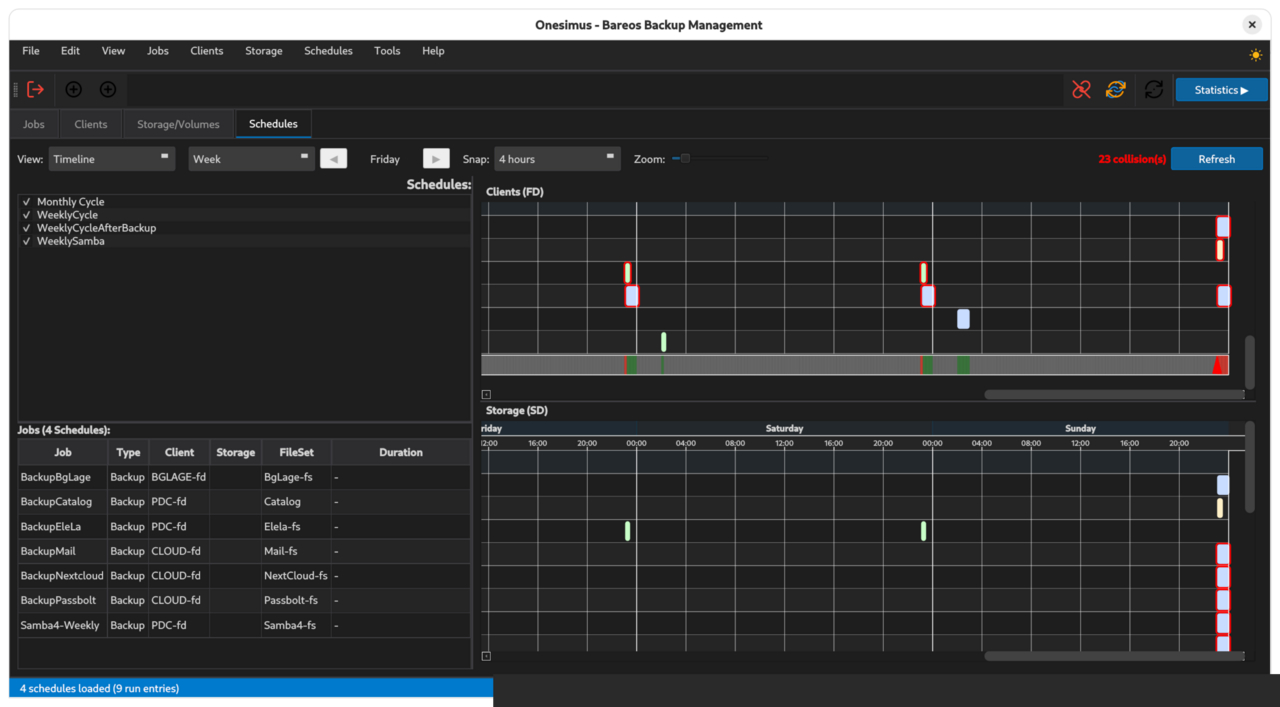
Schedule Gantt chart with weekly timeline and job table — dark theme.

Browser-based management at web.onesimus.io — Progressive Web App, any device, no installation.
Desktop & Web — your choice
Start with the native desktop client today. A browser-based version is on the way.
Onesimus Desktop
Native Qt6/C++17 application for Windows, Linux, and macOS. Direct bconsole connection to your Bareos Director with TLS encryption. Full job, client, storage, and schedule management.
Onesimus Web
Browser-based management interface — live at web.onesimus.io. No installation required. Access your Bareos environment from any device on your network. Installable as a Progressive Web App.
The questions every backup admin asks
Where does my storage go? When will the pool be full? Which jobs consume the most? What happens if I change retention? Onesimus gives you the answers — visually.
Job Management
View all backup jobs at a glance. Filter by status, level, date, or client. Run new jobs with auto-loaded defaults. Real-time statistics, BVFS file browser, and export to JSON or CSV.
Client Overview
Monitor all backup clients with online/offline status indicators. Add new clients through a guided wizard with auto-configuration.
Pool & Storage (v0.3.0)
Coming in v0.3.0: visual pool overview with volume status and storage management. Pro will add consumption analysis per job and client — see exactly where your storage goes.
TLS/SSL Security
Built-in TLS-PSK and X.509 certificate authentication with OpenSSL 3.6. Connection wizard with auto-detection of server capabilities.
Schedule Visualization
Gantt timeline with dual FD/SD view, weekly planner grid, and job list panel. See when jobs run, spot conflicts, and understand your backup windows at a glance.
Multi-Language
Available in 6 languages with automatic system language detection. Live language switching with native language names.
Runs where you work
Native builds for Windows, Linux, and macOS — plus a web version available now at web.onesimus.io.
Linux
AppImage, .deb packages, or build from source.
Windows
Native build with Visual Studio 2022 and NSIS installer.
macOS
Homebrew-friendly build with native Qt6 integration.
Browser
Onesimus Web — available now at web.onesimus.io. Installable as a PWA.
What bconsole can't show you
Two features that change how you manage Bareos — available now in the free Community edition.
Schedule Planning
See your entire backup schedule as a Gantt timeline. Spot collisions before they happen. Understand backup windows at a glance. Drag jobs across time slots. No more guessing which jobs overlap or when your storage daemon is overloaded.
┌─ Schedules ─────┐┌─ Gantt Timeline (Monday) ──────────────────────────┐
│ ☑ WeeklyCycle    ││  20:00    21:00    22:00    23:00    00:00         │
│ ☑ NightlyBackup  ││  ├────────┼────────┼────────┼────────┤            │
│ ☐ MonthlyFull    ││  ██████████░░░░░░  BackupDB (Full)                │
│                  ││  ░░░░████████████  BackupFiles (Inc)              │
│ Jobs:            ││  ░░░░░░░░░░██████████████  BackupMail (Inc)       │
│ BackupDB    45m  ││  ⚠ Collision: BackupDB + BackupFiles at 21:00    │
│ BackupFiles 1h2m ││                                                    │
│ BackupMail  2h   ││  ■ Full  ■ Incremental  ■ Differential            │
└──────────────────┘└────────────────────────────────────────────────────┘
Pool Management (v0.3.0)
See where your storage goes. Pool overview with volume status, fill levels, and retention timelines. Coming in v0.3.0 — the foundation for Pro's storage intelligence features. No more SQL queries to find expired volumes.
┌─ Pool Overview ────────────────────────────────────────────────────────┐
│  Pool             │ Volumes │ Used    │ Free    │ Retention │ Status  │
│  ─────────────────│─────────│─────────│─────────│───────────│─────────│
│  Full-Pool        │   12    │ 847 GB  │ 153 GB  │ 6 months  │ ██████░ │
│  Incremental-Pool │   45    │ 234 GB  │ 766 GB  │ 14 days   │ ██░░░░░ │
│  Differential-Pool│    8    │ 412 GB  │  88 GB  │ 30 days   │ ████████ │
│                   │         │         │         │           │  ⚠ 88%  │
│  Total: 65 volumes │ 1.49 TB used │ 1.01 TB free │ Next recycle: 3 days │
└────────────────────────────────────────────────────────────────────────┘
Real-world backup management
How industrial automation meets modern backup visibility.
Where we're headed
Built around what Bareos users actually need. Desktop and Web are live today — storage intelligence and enterprise scale are next.
Phase 1 — Desktop Client
The full-featured open source desktop client for Linux, Windows, and macOS. Job, client, storage, and schedule management with TLS security. Pool overview, Gantt timeline, weekly planner, and restore wizard. See what IS.
Phase 2 — Web Interface
Browser-based management for Bareos — live now at web.onesimus.io. No installation required. Access your backup infrastructure from any device on your network. Installable as a Progressive Web App. Built on direct feedback from the Bareos community.
Phase 3 — Pro
See what COULD BE. Storage growth trends, capacity forecasts, and optimization suggestions — which volumes to recycle, where space is being wasted. Powered by a native Bareos API integration currently in active discussion with the Bareos team.
Phase 4 — Enterprise
Simultaneous Director connections, capacity planning across infrastructure, and retention analysis with what-if simulation. Cross-Director scheduling, RBAC, LDAP integration, and audit logging.
Free & open source. Always.
Onesimus is in alpha. The Community edition is free forever. Pro and Enterprise are on the roadmap.
- Job, Client & Schedule management
- Gantt timeline & weekly planner
- Restore wizard with BVFS file browser
- TLS-PSK & X.509 authentication
- Cross-platform (Win / Linux / macOS / Browser)
- 6 languages, connection profiles
- MIT License — use it however you want
- Schedule conflict detection
- Multi-Director support
- Everything in Community
- Pool overview & storage visualization
- Storage consumption per job/client
- Growth trends & capacity forecasts
- Volume recycle recommendations
- Pre-built signed binaries
- Everything in Pro
- Simultaneous Director connections
- Capacity planning
- Retention analysis & what-if simulation
- Cross-Director scheduling
- RBAC & LDAP / Active Directory
- Audit logging & dedicated support
Latest from the blog
The 5 questions every backup admin asks — and how Onesimus answers them.
Onesimus and Bareos: In Talks About a Closer Integration
The Bareos project has approached us to discuss closer integration. Here is what that means for the Onesimus ecosystem.
Which Volumes Can I Recycle? — Reclaiming Storage Without Risk
Recycling volumes is the fastest way to free storage. But which ones are safe to recycle? That's the question.
What If I Change Retention? — The Simulation Every Admin Needs
Changing retention is a gamble without a way to preview the impact. Onesimus Enterprise will let you simulate before you commit.
Why "Onesimus"?
The story behind the name — and why your data is safe in the heavens.
Onesimus — Greek: Ὀνήσιμος, "the useful one" — was a runaway slave who was lost, transformed, and restored. His story from the Letter to Philemon is a story of backup and recovery, written two thousand years before the first hard drive.
Read the full story →Ready to modernize your backup management?
Onesimus Community is free and open source. Get started in minutes.